Hi,
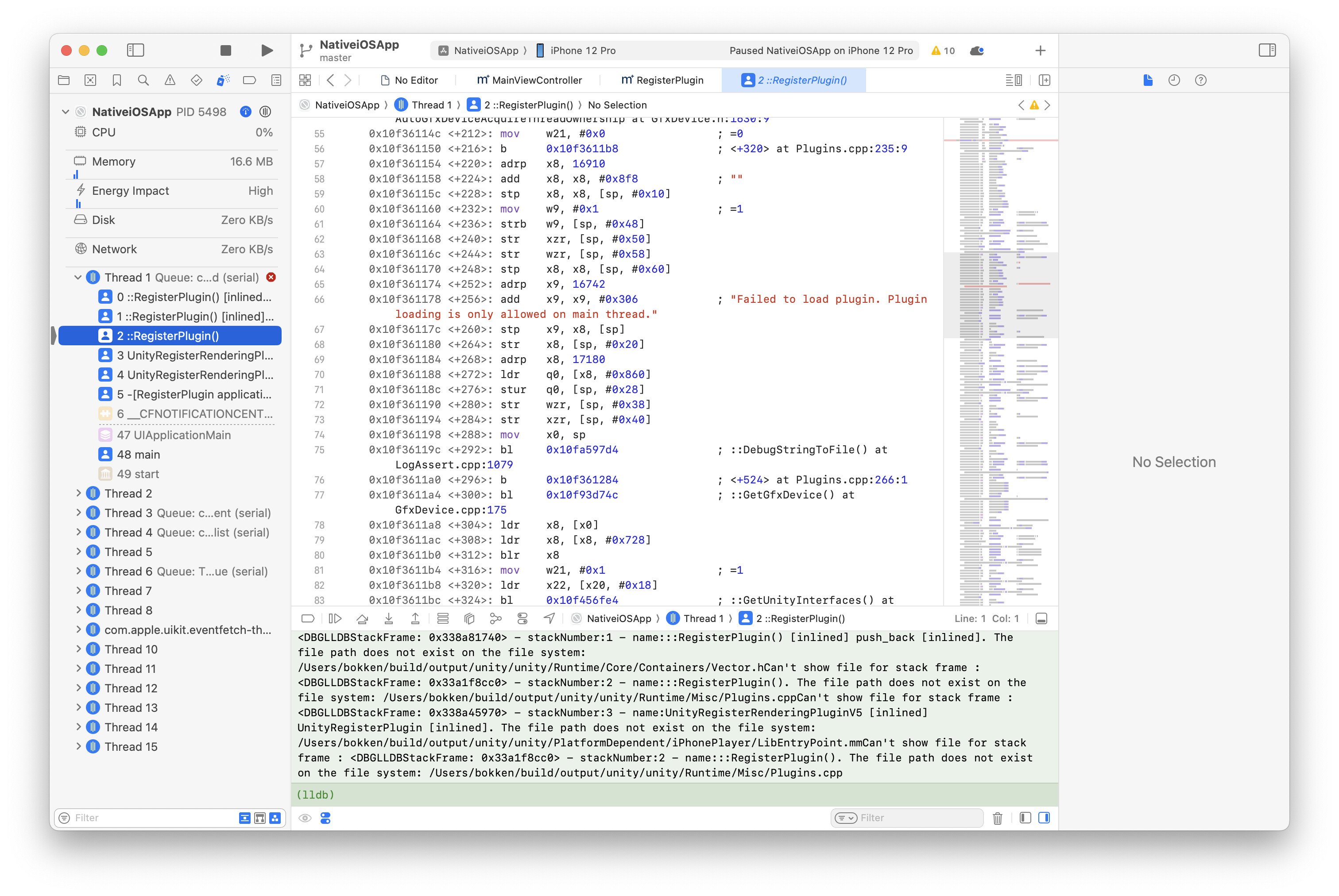
I’m having a problem with ARDK that crashes app with “Failed to load plugin. Plugin loading is only allowed on main thread.” as soon as app launched.
One thing I noticed that ARDK attaches main app’s lifecycle on load so it gets applicationDidFinishLaunching event even before UnityFramework started.
Are there any workarounds there?
I think this code should be called via Unity’s lifecycle event, not in main app’s.
Issue category: ARDK3
Device type & OS version: iPhone 12 / iOS 18.5
Host machine & OS version: Mac / Sequoia 15.5
Issue Environment : On Device
Xcode version: 16.4
ARDK version: 3.14.0
Unity version: 6000.0.36f1
Bug reproduction steps:
Create a Unity project from AR Mobile template.
Install ARDK3 from git repository.
Create Mesh object and add ARMeshManager component, create material fro it as well.
Build & Run to make sure it shows meshes.
Copy Plugins/ dir from UaaL example project into Asset dir.
Set NativeCallProxy.h public and add UnityFramework to Data folder in project, then build UnityFramework.
Copy UnityFramework to UaaL example project root and add UnityFramework and LightshipARDK to target.
Run app.
It will crash saying “Failed to load plugin. Plugin loading is only allowed on main thread.”
I’m sorry to hear you’re having trouble getting the ARDK to work on your mobile device. The steps you performed after “Build & Run” aren’t necessary and you don’t have to do any manipulation of plugins or directories to deploy to a device. I would recommend cleaning your build directory and building again. The most you should have to do in Xcode to deploy is update the team or account under Signing. Once the correct developer account is selected, you should be able to simply build to your device.
Let me know if you have further questions or need clarification.
Crash when embed Unity with ARDK inside IOS Native App I’m Stuck
Include the following details (edit as applicable): Issue category: Semantic Segmentation / Multiplayer / Real-time Mapping-Depth / ARDK Documentation / Unity Example Package / Sample App aka ‘AR Voyage’ / ARDK Virtual Studio Tools / Developer Tools / Networking Device type & OS version: Android / iOS / Other Ex. iPhone 11 on iOS 13 Host machine & OS version: Mac / Windows / Linux / Other Ex. Mac on Big Sur x.x Issue Environment : Unity Remote / Unity Mock / On Device / Dev Portal Xcode…
Since the ARDK is requesting the lifecycle on load prior to the framework’s initialization and startup, one potential solution would be to eagerly load the UnityFramework at application start. Eager loading should be completed within the AppDelegate.swift in the application function.
Please give that a try with the code you’re trying and let me know how it goes.
ARDK is requesting the lifecycle on load prior to the framework’s initialization
Yes, that’s the problem.
We want to run Unity on demand, so loading UnityFramework on parent app launch is not an option. Lazy loading frameworks is possible, but ARDK will miss applicationDidFinishLaunching(), so ARDK won’t initialize properly.
Is there a workaround to get ARDKFramework to work with lazy loading?
Something you can try is disabling “Initialize XR on Startup” in XR Plug-in Management and manually initializing XR from a script as shown here, but even then lazy loading may not work because of the presence of static constructors and other Unity dependencies.
I already tried that. But as you know ARDK hooks app’s applicationDidFinishLaunching handler on library load, not Unity’s life cycle event, it won’t work.
I’m going to try some based on the ARDK git tree and see if there’s a workaround.
I’m experiencing the same issue and could use some help. I’ve already tried disabling “Initialize XR on Startup”, but unfortunately that didn’t solve the problem.
Has anyone successfully run Lightship ARDK on iOS when using Unity as a Library?
Using the ARDK in conjunction with Unity as a Library isn’t something we actively test nor target and isn’t officially supported.
Because of this, the most likely fix will be hacky and involve reflection to disrupt the ARDK’s hook to applicationDidFinishLaunching handler and ensure the Unity framework is running prior to the ARDK’s startup.
I kinda got things working now. It works with built-in render only tho. URP renderer crashes as soon as Mesh updated. It seems timing issue in ARFoundation side I suspect.
I’ll post the fix later. It’s simple, not really hackish IMO.
I wrote in my previous post that it “works,” but that was wrong. It only works at first load but the Mesh doesn’t get updated on subsequent loads. I’m not sure if this is due to my complex code or an issue with ARDK. I’m trying to solve it with a simple project, but so far it hasn’t worked.
In any case, I’ll organize the changes related to lazy loading and post it some time in next week.
I managed to get it to work here, but it required a lot of compromises. The biggest compromise was not to unload UnityFramework. If it’s unloaded even once, the ARDK Framework’s MeshingModule will stop working, and the ARMeshManager’s meshesChanged callback will no longer be called.
The workaround is to load UnityFramework and ARDK Framework once and keep them on memory. Then, when not in use, stop ARMeshManager and ARSession instead of unloading them, to simulate the unloading of Unity.
This is not memory efficient, but I haven’t found any other solution so far.
How to integrate:
Clone ARDK from the git repository.
Next, copy the attached RegisterPlugin.h and RegisterPlugin.mm to ardk-upm/Runtime/Plugins/iOS. Overwrite RegisterPlugin.mm.
In the Unity project’s Package Manager, select Install package from disk and add ardk-upm/package.json.
When building UnityFramework from UnityProject, make RegisterPlugin.h public.
Also, add IS_UNITY_FRAMEWORK=1 to the Preprocessor Macros in UnityFramework’s Build Settings.
Load the ARDK immediately after loading UnityFramework in your NativeApp.
From here, do not call UnityFramework’s quitApplication to stop Unity. Instead, temporarily disable the AR subsystem (ARMeshManager, ARPlaneManager, etc.) and ARSession as needed.
Excellent work and I’m happy to not only hear you’ve managed to get the ARDK to load with Unity as a library, but that you’ve also provided detailed steps for others to do the same.
Would you be comfortable sharing a video of your work showcasing AR features working?
Device I used is normal iPhone 12, no LiDAR. The translucent veil-like thing is a Mash material to visualize ARDK Meshing in action.
The parent native app is pretty much same as the UaaL example’s native app, just added lazy loading stuff I uploaded in previous post and messaging to enable/disable AR with child Unity app.
Unity and ARDK are loaded at first launch and then kept in memory.