Remove Bad Mesh from Activated VPS

Include the following details (edit as applicable):

  • Issue category: VPS
  • Device type & OS version: OnePlus 13 China Version with ColorOS 15/iPhone 11 Pro Max with iOS 18.6.2
  • Host machine & OS version: Windows
  • Issue Environment : Dev Portal

Description of the issue:

Hello, due to the poor support for the Scaniverse software on my OnePlus 13 China Edition, I scanned numerous portals using it and generated many problematic mesh models.

When I realized this issue and tried scanning updated models with my iPhone, it was already too late. I hope the development team can delete all the data I scanned and allow me to rescan with my iPhone to generate new mesh models. I would be extremely grateful for any assistance!

Please see the infos below.

Due to restrictions, I am unable to upload all the images.
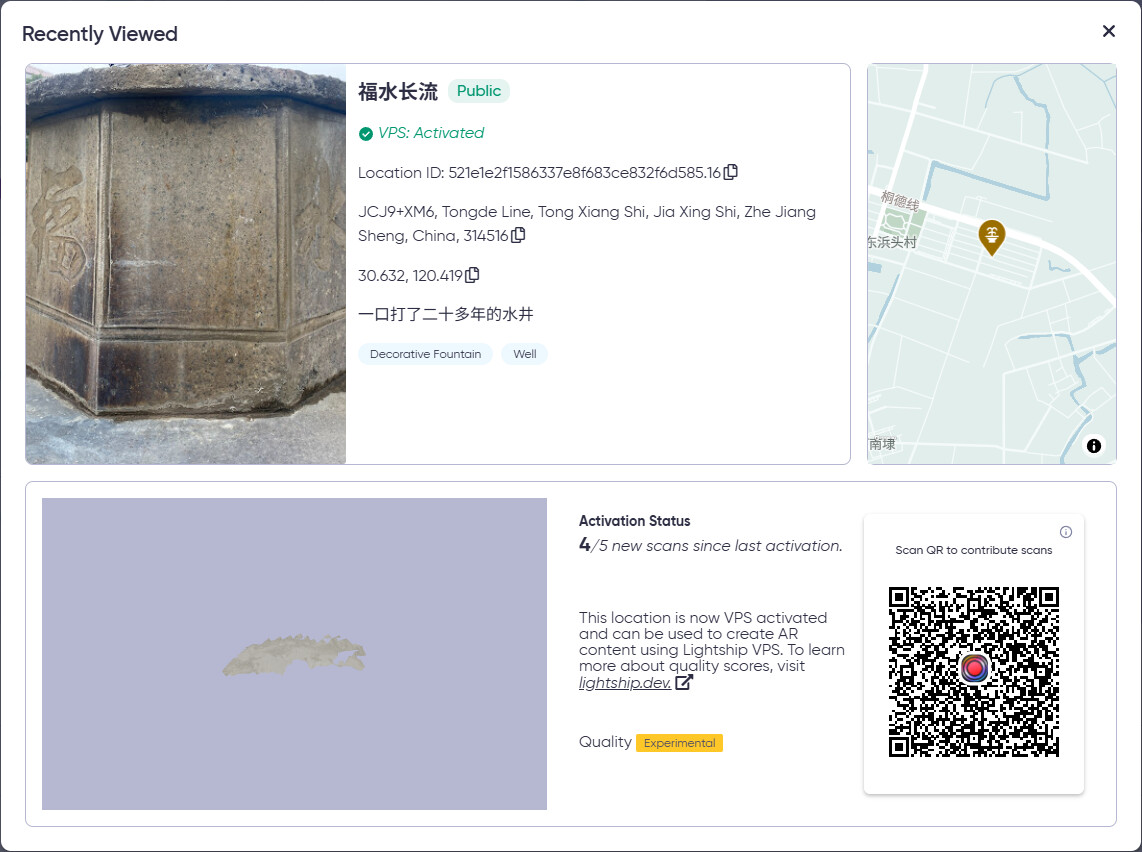
Location ID: 521e1e2f1586337e8f683ce832f6d585.16

JCJ9+XM6, Tongde Line, Tong Xiang Shi, Jia Xing Shi, Zhe Jiang Sheng, China, 314516

30.632, 120.419

Location ID: b0cbde22848b3c65876536e5f373d18f.16

China, Jia Xing Shi, Tong Xiang Shi, 东浜头 邮政编码: 314516

30.633, 120.416

Location ID: fb45e7560e7b3036b2bacf6311b0cd3a.16

JCM7+CG9, Tongde Line, Tong Xiang Shi, Jia Xing Shi, Zhe Jiang Sheng, China, 314516

30.633, 120.415

Location ID: 3500d8be45f13931b03d1ccec73ddceb.16

China, Jia Xing Shi, Tong Xiang Shi, 东浜头 邮政编码: 314516

30.633, 120.416

Location ID: 26d1b5df46cb470f8f369e49af78fcf6.16

Tong De Xian, Tongxiang Shi, Jiaxing Shi, Zhejiang Sheng, China, 314512

30.633, 120.416

Location ID: 1e67cecd4cab33ccbb7045f1e6f0fb1f.16

China, Zhe Jiang Sheng, Jia Xing Shi, Tong Xiang Shi, 学前路30号 邮政编码: 314599

30.637, 120.548

Location ID: d9b36107d52835e5bf69f94c088d490a.16

70 Qingfeng N Rd, Tongxiang Shi, Jiaxing Shi, Zhejiang Sheng, China, 314505

30.638, 120.550

Location ID: b7e3ae33d7da3faeb01556a3921d5b55.16

70 Qingfeng N Rd, Tong Xiang Shi, Jia Xing Shi, Zhe Jiang Sheng, China, 314599

30.638, 120.550

Location ID: 1de4be51b2a2348fac1fa28b31ba912a.16

China, Zhe Jiang Sheng, Jia Xing Shi, Tong Xiang Shi, 茅盾西路51 邮政编码: 314599

30.638, 120.549

Location ID: f17c62e66e843be9b92f583871a89f84.16

JHQ4+75G, Maodun E Rd, Tong Xiang Shi, Jia Xing Shi, Zhe Jiang Sheng, China, 314599

30.638, 120.555

Location ID: 89738e76acc44aa6b2c500396a9d31f4.16

463号-481 Ying Feng Lu, Tongxiang Shi, Jiaxing Shi, Zhejiang Sheng, China, 314500

30.634, 120.563

Location ID: 26e6124f573f33f9a90465678a655587.16

RGC9+8C Wujiang, Suzhou, Jiangsu, China

30.821, 120.519

Location ID: 8c9b04ca2b3549e8bd38b5a89ee38859.16

Peng Cheng Xi Lu, Haiyan Xian, Jiaxing Shi, Zhejiang Sheng, China

30.578, 120.824

Hi Frank,

Thank you for reaching out!

While the photos of the scan meshes look discouraging, they only show a chunk of all available scan data for your particular location. For example, I’ve attached an image of the full mesh for JCM7+CG9, Tongde Line, Tong Xiang Chi, Jia Xing Shi, The Jiang Sheng, China, 314516 below.

You are absolutely not doing anything wrong. In fact, you’re doing exactly what we expect developers and users to do when they want to make a location localizable. Please do not let the Geospatial Browser images discourage you as every part of each scan you submit is being used to train our algorithm.

Let me know if you have any other questions or need clarification.

Happy Scanning!
Maverick L.

Hello Maverick,

The red boxes I marked in the image indicate the same object, but it appears multiple times with inconsistent orientations.

Despite this, this mesh model remains the highest quality among the VPS portals I submitted. Therefore, I attached it but later deleted it.

I hope you can continue reviewing the remaining VPS portals and support my deletion request, granting me another opportunity to rescan and remodel.

Thank you very much!

Hi Frank,

Thank you for your patience. We’ve received other reports of problems with the OnePlus device in particular, so at this time I highly recommend using your iPhone 11 Pro Max in the meantime while we investigate the cause of the issue.

What’s more, are you encountering issues with localization? If not, then I still recommend continuing to scan the locations with your iOS device to naturally filter out the duplicated sections of mesh.

I sincerely apologize for the inconvenience and appreciate your patience as we investigate the cause of these problems.

Kind regards,
Maverick L.

Hi Maverick,

In short, I’m still encountering issues with localization. Even if I rescan with an iPhone, I simply can’t overwrite the old model.

Yes, this is a complex issue. Repeated scanning does not update these duplicated, fragmented models as we had hoped. I have already patiently scanned these portals dozens of times in Scaniverse. Therefore, I would like you to completely delete these models so I can start over with new equipment to generate more reliable models. Thank you very much for your response, and I look forward to receiving the solution I need.

Thank you!

Perhaps there should be an information card or a disclaimer attached, that the displayed mesh isn’t representative of all the data.

maybe there should be a way for users to report any such broken images to the team, and the system should be able to filter out those models or delete them completely. repeated scanning only applies a bit of paint to the model but unless the base is fixed, it will remain broken.

Also the scaniverse app could be enhanced such that it will display live data on the object and emphasise areas that do not have enough data for localisation.